Looking for Steal an Egg scripts for Roblox? Start with Auto Farm to cut down on repeated actions, explore Auto Hatch and Egg ESP, or browse the No Key options. Find a script card to see its features and copy the code. Need help on Android, iOS or Windows PC? Jump to the setup guide for your device.
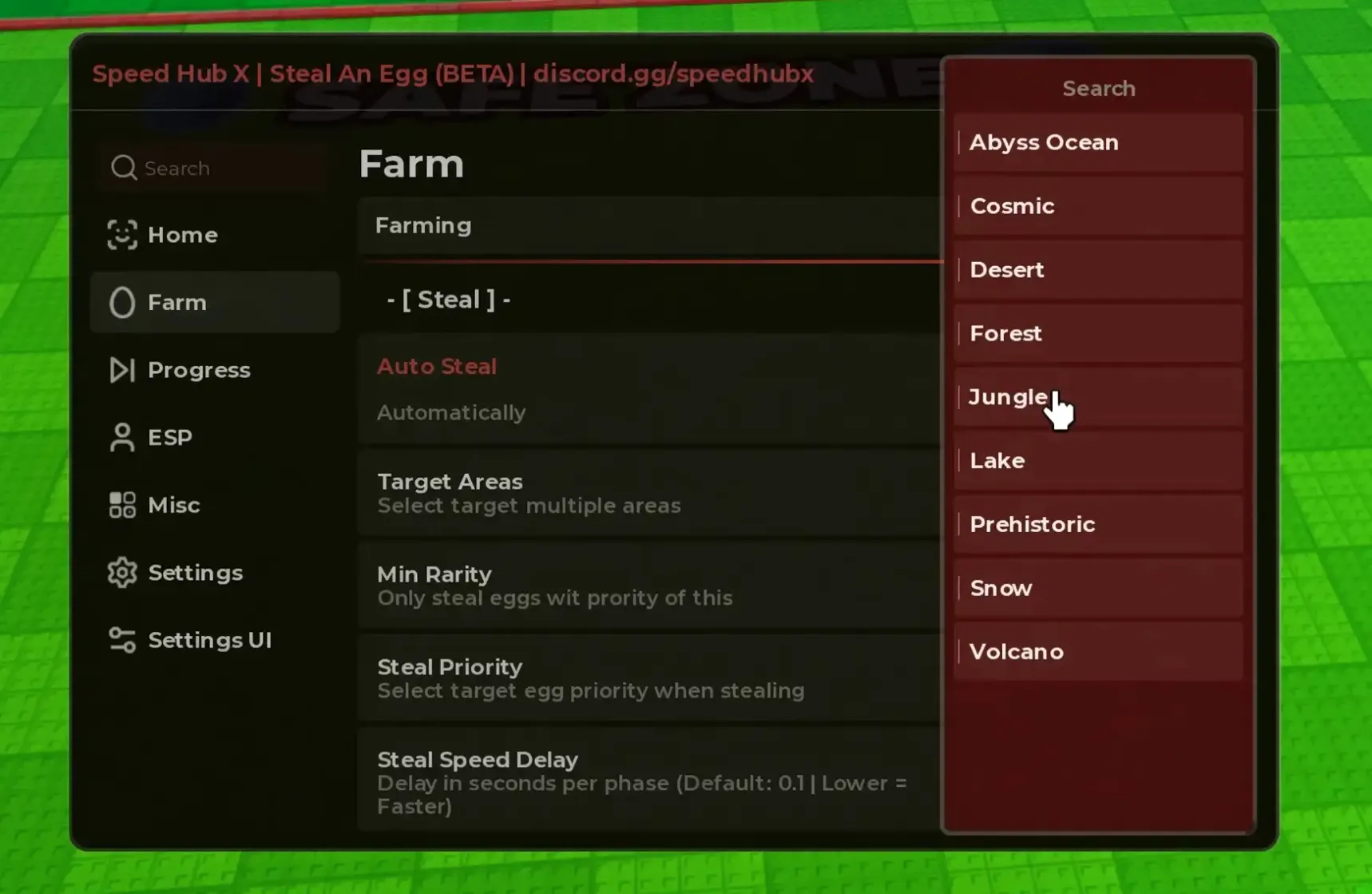
Speed Hub X is a multi-game hub with a dedicated Steal an Egg Farm tab for stealing eggs automatically in selected zones. Set the minimum rarity, target priority, and delay between steal phases, then use ESP, progress tools, and interface settings; the loader detects the game and loads the current module without a key.
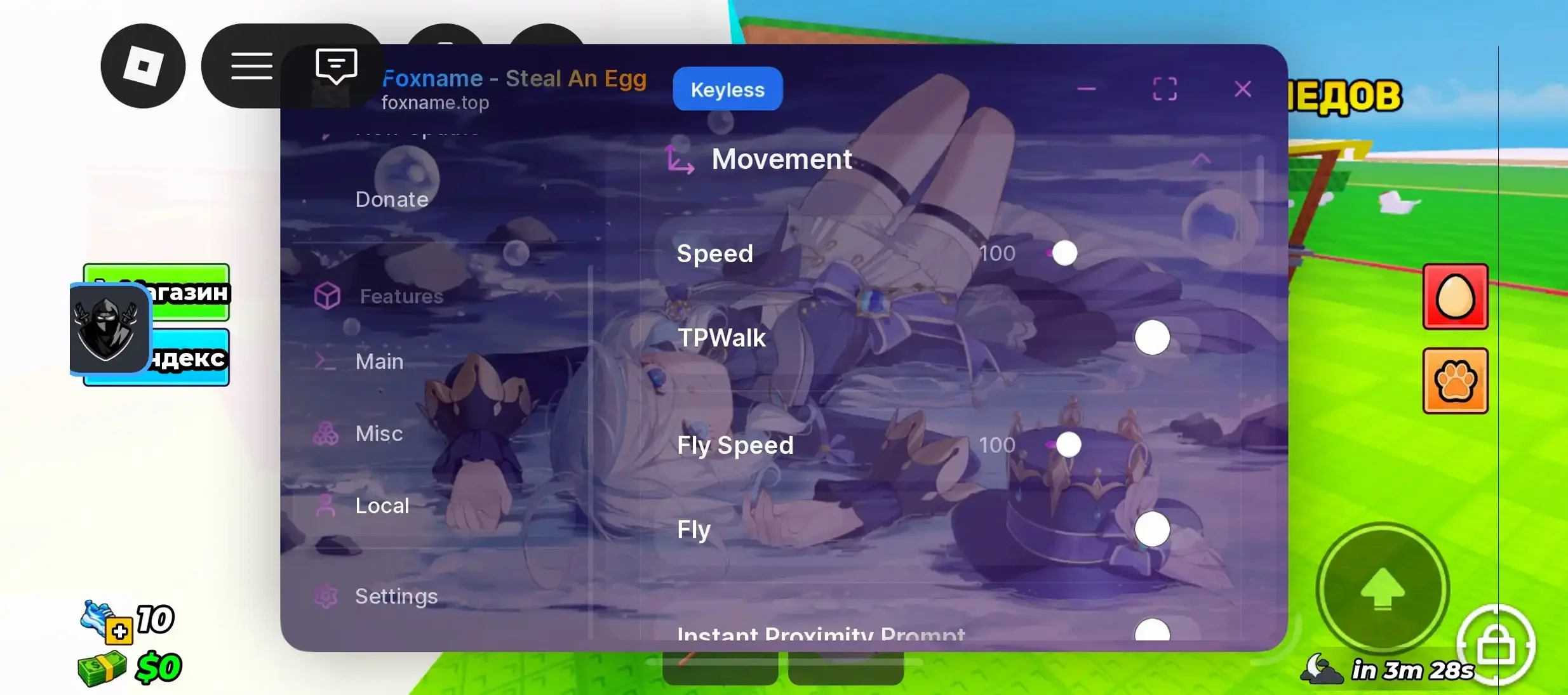
Foxname targets the rarest egg on the server with adjustable auto-steal speed, a Monster Parasite event mode with rarity filters, and a bat aura. Its movement tab includes speed, TP-Walk, adjustable flight, and instant interaction prompts, while the interface clearly marks the build as keyless.
Ovei Hub (Velox) for Steal an Egg supports targeted stealing with selectable zones and a chosen egg, plus automatic collecting, hatching, and selling. It also includes inventory, upgrades, trails, and changelog tabs, while the Jnkie loader uses a key system.
Pig Hub streamlines your base routine in Steal an Egg with automatic hatching, top-pet equipping, reward collection, base upgrades, and treadmill use. Its Steal and ESP tabs also handle egg theft with selling and highlight eggs across the map.
Solix Hub for Steal an Egg includes egg auto-farming with Smart Tween speeds up to 800 studs/s, instant placement and stealing, God Mode, night farming, friend filtering, egg return, rarity priorities, and dropped-egg sniping. It also offers auto-selling with egg and mutation selection, auto-claim, an AFK treadmill, lane upgrades, auto rebirth, and a weather prediction tab. A key is required for Steal an Egg.
Oxide Hub is a free, open hub with a clean Lua module for Steal an Egg hosted on GitHub. Its Eggs tab supports automated stealing with movement options, infected-egg filters, instant prompts, rarity priorities, multi-filters, glide speed, and theft delays, plus hatching, Egg Tracker ESP, base, combat, player settings, and God Mode.
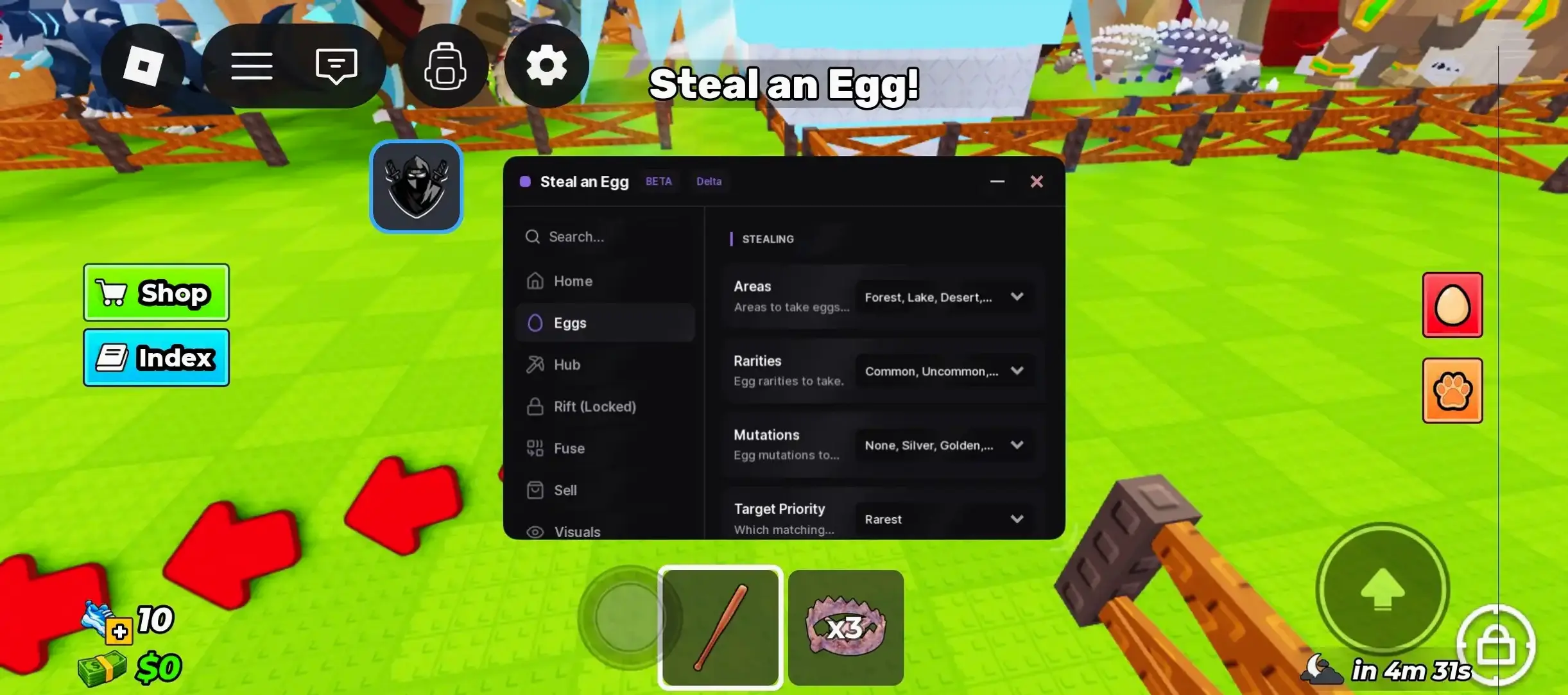
A compact Steal an Egg menu made for mobile Delta users. Choose target zones, egg rarities, mutations, and priority settings, then use the hatching, selling, visuals, and Rift event sections. No key is required—inject and start playing.
Axon Hub covers the full Rift event in Steal an Egg, including boss farming, gliding to rifts, bat attacks, vulnerable-boss damage, and limited auto purchases from the boss shop. Its main tabs also include instant stealing, egg finding, and God Mode. Uses a Luarmor loader.
Catalog check: Executor: DeltaXenoWhat does Axon Hub automate?
It automates the Rift event, including rift travel, breaking rifts with a bat, attacking the vulnerable boss, boss farming, and boss-shop purchases with limits and delays.
Does the script include instant stealing and egg finding?
Yes. The standard tabs provide instant stealing and egg-finding options, along with God Mode.
Which injectors are compatible with this script?
Axon Hub is compatible with the Delta and Xeno injectors.
UB Hub for Steal an Egg predicts which pet will hatch from an egg before you steal it. The main menu includes auto steal, auto place, auto hatch, auto train, auto sell, and auto favorite options, plus separate Rift event, shop, and webhook sections. Its universal loader detects the game by ID and loads the correct module.
BigFroot for Steal an Egg automates egg theft with filters for zones, categories, rarities, mutations, and minimum weight. It can prioritize targets, return to your plot or last position, hide from the dragon wave, avoid traps, adjust glide speed, block treadmills, and includes progress, pets, Sakura, Fuse, visuals, gifts, and webhook tabs. Free build with a Luarmor loader.
Rift Hub for Steal an Egg automates egg theft, prioritizes the best available egg, and supports zone and mutation filters. It can return you to base, instantly steal eggs, manage stolen items through the Manage tab, and includes a dedicated Titan Temple mode with God Mode.
Zeroin Hub for Steal an Egg enables instant tween-based stealing with adjustable speed from 20 to 100. Choose eggs by value, name, zone, or rarity, while separate tabs provide events, auto boss combat, a webhook, and a control panel. The script loads from the authors’ server, so it can update without changing the link.
Steal an Egg rewards attention to eggs, pets and the next upgrade. A useful script menu starts with a task you actually want to repeat: finding eggs, opening them, or spending more time training Speed. This guide explains how Steal an Egg scripts fit those tasks in Roblox, what Auto Farm and No Key mean, and how to move from a script card to your device’s setup instructions. Start with the catalog above when you already know a hub name. If you are choosing your first script, compare a few functions before copying its code; a longer menu is not automatically a better match.
Steal An Egg in Roblox: Eggs, Pets and Base Upgrades
The Roblox page for Steal An Egg describes a loop built around stealing eggs from pets and other players, hatching them, and collecting pets that earn money. You then use progress to improve your base and treadmill. Training on the treadmill builds Speed. Eggs and pets can differ in rarity, size and mutations, so looking for a suitable egg is part of the game rather than a separate minigame.
Those activities connect. An egg matters because of what you can hatch; a pet matters because it contributes to your collection and income. Base development gives that collection a purpose, while treadmill training is another repeated activity to manage between trips. Think about where you spend the most time during an ordinary session. If you keep opening eggs, a hatch function is more relevant than a menu filled with movement options. If you struggle to spot eggs, visual tools answer a different need.
Keep the correct experience open when comparing instructions. Similar names do not make two Roblox games interchangeable, and a loader that opens a menu in another game does not prove its Steal an Egg module works. Use the game link here to reach the intended place. You do not need invented prices or pet names to choose a script: your current task, the script’s actual description and the menu’s available controls are the useful starting points.
Steal An Egg Auto Farm Scripts
Auto Farm is an umbrella name for repeating actions. In Steal an Egg, read the description to see which part of the egg-and-pet loop a particular script automates. One menu might focus on egg collection; another might group several actions under a Farm tab. The label does not tell you whether hatching, training or collecting income is included. Select a script because its stated task matches yours, then open its page to see the complete list.
Before enabling a farm routine, check its controls. A target selector, delay or filter changes what the routine attempts. Start with one available function so that you can see its effect. Enabling several routines together makes a missing action harder to diagnose: you cannot easily tell whether the target selection, movement or hatch setting caused it. Keep access to the menu’s stop control and watch the first cycle before leaving a repeated action running.
Match your task to a script function
I want to…
Function
What to look for
Reduce repeated gameplay actions
Auto Farm
The exact actions and target settings described by the script
Repeat egg hatching
Auto Hatch
Hatch controls and their conditions
See eggs more clearly
Egg ESP
Visible markers and display settings
Repeat Speed training
Auto Treadmill
Treadmill training controls
This comparison helps you avoid choosing by a broad promise such as “everything automated.” Auto Farm and Auto Hatch may appear in the same menu, but they remain different actions. Each card includes the full description, key requirement and original code. Copy it directly or choose DOWNLOAD, wait 15 seconds and save the .lua file. If a function you need is absent from that record, choose another script rather than assuming its name guarantees it.
Auto Hatch, Egg ESP and Other Script Features
Auto Hatch and Egg ESP in Steal An Egg
Auto Hatch concerns opening eggs and hatching pets. Look at any selection or stop conditions exposed by the actual menu before turning it on. It is useful to distinguish opening an egg from finding one: a hatch routine does not necessarily collect eggs for you. When a menu separates those controls, try them separately and confirm that you have the prerequisites shown by the game or script.
Egg ESP is a visual aid. It marks eggs so you can identify objects in the world more easily. Its labels, colors and information depend on the script. A marker can help you navigate or decide where to look; it does not itself change an egg’s rarity or guarantee the pet that will hatch. On a small screen, start with the simplest display so labels do not hide the controls you need to tap.
Auto Treadmill and Speed in Steal An Egg
Auto Treadmill targets repeated treadmill training, linking the menu to Steal an Egg’s Speed activity. It is separate from a movement or speed slider, which may change another aspect of the script. Read the function’s description instead of treating every Speed-related label as the same feature. Choose a training option when treadmill repetition is your task; choose a visual or hatch option when your focus is eggs. No multiplier is implied by the function’s name.
Steal An Egg Scripts with No Key
No Key means the script is listed as not requiring its own activation key. It makes that part of the process simpler: you obtain the original code and continue with the appropriate executor instructions. Use the No Key filter to see records with that explicit value. A missing key field is not a keyless claim, and a title alone does not establish the requirement.
The executor can have a separate access process. A keyless Steal an Egg script may therefore still run in a program that asks for its own key. Notice where a prompt appears: inside the program’s main interface or inside the script’s menu. That distinction tells you which instructions to follow. If an unexpected key prompt appears after copying a listed No Key script, report the record and its source rather than repeatedly pasting variations of the code.
Cheats and Hacks: What Script Menus Can Do
Players looking for Steal an Egg cheats or hacks often want a menu that automates an egg task or makes objects easier to see. The useful question is which action the menu offers. Auto Hatch, Egg ESP and training controls solve different problems; none should be inferred from the word Hack in a title. Compare the functions on the chosen script card and focus on the task you will use during play.
The code, script menu and executor play different roles. Code loads or defines the script; a menu provides its controls; an executor is the program used to run it in the Roblox context. The browser on this site displays text and copies it. It does not execute Lua or modify your Roblox session. Keep that sequence clear when a menu fails to appear, because copying successfully only confirms the clipboard step.
Steal An Egg Scripts for Delta, Xeno and Solara
An executor is a separate program for running script code. Delta, Xeno and Solara are names to compare against the compatibility field of your selected script. That field describes a relationship with a program, while the program’s platform information answers whether it fits your device. You need both answers. A script mentioning Xeno does not thereby support every device on which Roblox is available.
For Delta, start with the current device-specific instructions and check whether the chosen script lists it. For Xeno, keep its own setup sequence and supported platform separate from Delta’s. For Solara, use the corresponding version’s preparation and execution instructions; do not carry over a button name from another program. Current setup instructions for these products are not yet verified here. The executor guide explains what to collect before proceeding.
Once real catalog instructions are available, read them in order. They can describe preparation before the game opens or interaction with an already open client. Keep the exact source code unchanged. A product’s popularity, a similar-looking logo or an old tutorial is not a substitute for the instructions that match your version.
Steal An Egg Scripts on Android, iOS and PC
Steal An Egg Scripts on Android
On Android, begin with the Android section of the executor guide. Confirm that the program’s current package targets Android and that your selected script lists the program. Open the script card, use Copy Script, and paste the complete text into the program’s script editor according to its instructions. The browser’s address bar is not that editor. After execution, use the menu’s touch controls and test a single function first.
A phone’s keyboard can cover part of the editor or menu. Dismiss it when inspecting the result, and rotate the screen only if the application supports that orientation. If a toggle is hidden, reposition the menu using its own controls instead of enabling another routine blindly. An Android package is a device-specific file; it is not an iPhone installation method.
Scripts on iOS and iPhone
No current iOS execution method is verified here. You can still read descriptions, compare key requirements and save the original code on an iPhone or iPad. Before attempting execution, obtain current instructions that explicitly cover your iOS version and the selected program. Do not treat an APK, a Windows executable or a mobile-looking web page as proof of iOS support. The iOS guide section keeps this question separate from Android.
Steal An Egg Scripts on Windows PC
On a Windows PC, keep track of three windows: the site in your browser, the Roblox game client and the executor’s editor. Copy from the site, enter the intended game and follow the program’s documented preparation sequence. Paste into its editor, execute using that version’s instructions and look for the script menu in the appropriate context. A successful copy is not a successful connection to Roblox. If nothing appears, review the sequence before trying a second script.
How to Use Steal An Egg Scripts in Roblox
Choose the executor for your operating system first, using its current instructions and the selected script’s compatibility field. Reach the correct Steal An Egg experience through the Roblox link. Then open the script card and copy the entire original code. Avoid removing quotes, line breaks or the last characters of a loader when moving it into the editor.
Paste into the executor’s script editor and complete its documented execution process. The button names and preparation sequence belong to that program, so do not expect every executor to use the same Inject control. When the menu appears, select one available function such as Auto Farm, Auto Hatch or Egg ESP. Review its settings, observe what it does and keep its stop action accessible. The full launch guide walks through copying, sources and keys. If no menu appears, move to troubleshooting rather than assuming the site must run the code for you.
Script Not Working? Troubleshooting
If no menu appears, check the game, full copied code and executor’s preparation first. If the menu appears but one feature does nothing, check that feature’s target and prerequisites. If a key prompt appears, identify whether it belongs to the script or executor. These are different symptoms and deserve different next steps.
Read the troubleshooting guide for the symptom you see. A catalog check date helps you understand how old the supplied status is, but it does not refresh when you reload a page. When reporting a problem, include the script name, device and visible error text. Leave account passwords and session cookies out of the report.
Script FAQ
What does a Steal An Egg Auto Farm script do?
It repeats the gameplay actions described by that script. Read the Farm controls to see whether it concerns collecting eggs or another routine. Auto Farm does not automatically include every hatch, visual or treadmill option.
Are there Steal An Egg scripts with no key?
Use the No Key filter for records explicitly marked keyless. In this preview the records are samples. A script’s key requirement is separate from any access key requested by the executor.
Can I use Steal An Egg scripts on Android or iPhone?
You need an executor confirmed for your operating system and compatibility with your script. Android and iOS are separate cases. No iOS method is currently verified here; you can still compare scripts and copy their text.
Which scripts work with Delta, Xeno or Solara?
Consult each record’s compatibility field and the current executor instructions. A program name in this article does not assign compatibility to all scripts, and the program’s platform does not establish the script’s behavior.
Is a script the same as a Roblox game code?
No. A script is code used in a script editor. A redeem code, when a game provides such a system, is entered in its own redemption interface. These fields and actions are not interchangeable.
Why is my script not working?
Start with the symptom: no menu, one inactive function or a key prompt. Verify the corresponding game, code, setting or access requirement. Report a reproducible error through Contact if the instructions do not resolve it.
Cookie Settings
We use cookies to run the site, measure visits and show ads. Allow keeps optional cookies enabled; Necessary Only disables them.